Contents
FOUNDER PLAYBOOK

Vibe Coding Apps: From Idea to Launch and Beyond

A structured 7-phase path for early-stage founders to go from idea to market, build momentum, and keep growing.

START HERE

How to Use This Playbook

Vibe coding has made building software faster than ever. It has not made building a business any easier. This playbook gives you the full path: seven phases that take you from a rough idea to a launched product with a steady stream of users, and then back around again with better information.

Who this is for

This playbook is written for early-stage founders, indie hackers, and first-time builders who want to ship a product without a large team or a large budget. You do not need to be a developer. You do need to be willing to ship something imperfect, put it in front of real people, and learn from what happens.

How the playbook works

The seven phases build on each other: Idea, Build, Brand, Launch, PR, Content, Analytics. Each chapter follows the same structure so you always know where to look:

  • Why this phase matters. The reasoning, so you can adapt the advice instead of copying it blindly.
  • How to do it. The steps, in order, with enough detail to act on today.
  • Your tool stack. The tools worth using, what each is for, and what to watch out for.
  • Worked example. A real-world example with a breakdown you can copy.
  • Prompts you can copy. Ready-to-use AI prompts for the hardest parts of the phase.
  • Common mistakes. The errors that cost founders the most time.
  • Checklist and "You're done when." A clear finish line, so you know when to move on.

Three rules that run through every chapter

  1. Ship small, learn fast. A small thing in front of real people teaches you more than a perfect thing in your head.
  2. Evidence beats opinion. Your opinion, your friends' opinions, and the AI's opinion are all weaker than what a real user did.
  3. Every phase feeds the next. Skipping a phase does not save time. It moves the cost to later, when it is more expensive.

How long does it take? It depends on you, your idea, and how much time you can give it. Use the phases as a sequence, not a schedule. The 30-day plan at the end of this playbook shows one way to move through all seven in a month.

Contents

  1. Idea: Find Something Worth Building
  2. Build: Ship Your MVP
  3. Brand: Turn MVP into a Trusted Product
  4. Launch: Get Discovered
  5. PR: Get People Talking
  6. Content: Stay Visible
  7. Analytics: Understand What Worked
  8. Summary: Build the Loop
  9. Your First 30 Days
  10. Glossary
PHASE 1

Idea: Find Something Worth Building

Before writing a single line of code, validate that the problem is real and the market exists. Use AI research tools and community signals to narrow in on a wedge worth pursuing.

Why this phase matters

AI has made building cheap. That changes what is scarce. The hard part is no longer producing software, it is knowing what is worth producing. A founder who builds the wrong thing quickly has still built the wrong thing.

The goal of this phase is not a brilliant idea. It is evidence: proof that a specific group of people has a specific problem, feels it often, and is already trying to solve it. When you have that, the rest of the playbook gets much easier.

You are also looking for a wedge. A wedge is a narrow entry point where you can win a small group of people completely, before expanding. "Project management for everyone" is not a wedge. "Client approval tracking for freelance video editors" is.

Founder tip: The best ideas often hide in plain sight, in forum rants, support tickets, and "there has to be a better way" moments.

How to do it

  1. Start where you have an edge. Pick a space you know from your job, your hobbies, or a community you belong to. You will spot real problems faster and stay interested longer. Aim for something you could happily work on for a year.
  2. Hunt for pain in public. People describe their problems for free all over the internet. Look in Reddit threads, X posts, niche forums, app store reviews, product reviews of existing tools, and "alternative to [tool]" searches. Complaints about a tool that already exists are a strong signal: demand is proven, and the gap is visible.
  3. Keep a pain log. For every promising signal, record a quote, a link, who said it, how painful it sounds (1 to 3), what they do today to cope, and whether they already pay for something. A simple spreadsheet is enough.
  4. Cluster and count. After 30 to 50 entries, group them into themes. The themes that repeat across different people are your candidates. One angry post is an anecdote. Ten similar posts are a pattern.
  5. Stress-test with AI. Use ChatGPT or Claude as a sparring partner. Ask it to argue against each candidate, name likely competitors, and list what would have to be true for the idea to work. Use Perplexity to check the market with cited sources.
  6. Define the wedge. Write one sentence: "I help [specific person] do [specific job] so they can [outcome], without [current pain]." If you cannot fill it in with specifics, the idea is still too broad.
  7. Talk to five real people. Find them where you found the pain. Ask about the last time the problem happened, what they did, what it cost them, and what they have tried. Ask about the past, not the future. "Would you use this?" produces polite lies. "Tell me about the last time this happened" produces truth.
  8. Make the call. Decide to build, narrow, or drop. Build only if the pain is frequent, people already spend time or money on it, you can reach them, and you can ship a first version in weeks.

Your tool stack

ChatGPT and Claude

What they are for: brainstorming problems, exploring markets, and stress-testing assumptions fast.

How to use them well: give them real material. Paste in 20 posts from your pain log and ask for themes, or paste your wedge sentence and ask for the strongest objections. Ask for counterarguments, not encouragement.

Watch out for: confident but invented facts, especially numbers and competitor details. Treat output as a lead to check, not a conclusion.

Perplexity

What it is for: AI-powered search with cited sources, for deeper market research.

How to use it well: ask specific questions such as "Who are the main competitors for X, and what do users complain about?" Then click through the sources and read them. The citations are the point.

Watch out for: shallow answers on very niche topics. When sources are thin, go find the community directly.

Reddit and X

What they are for: listening to real conversations and finding pain points people are already complaining about.

How to use them well: search for phrases like "is there a tool that," "I wish there was," "how do you handle," and "alternative to." Read the comments, not just the posts. Disagreement in the comments often shows where the real problem sits.

Watch out for: loud minorities. Look for repetition across many people before you trust a signal.

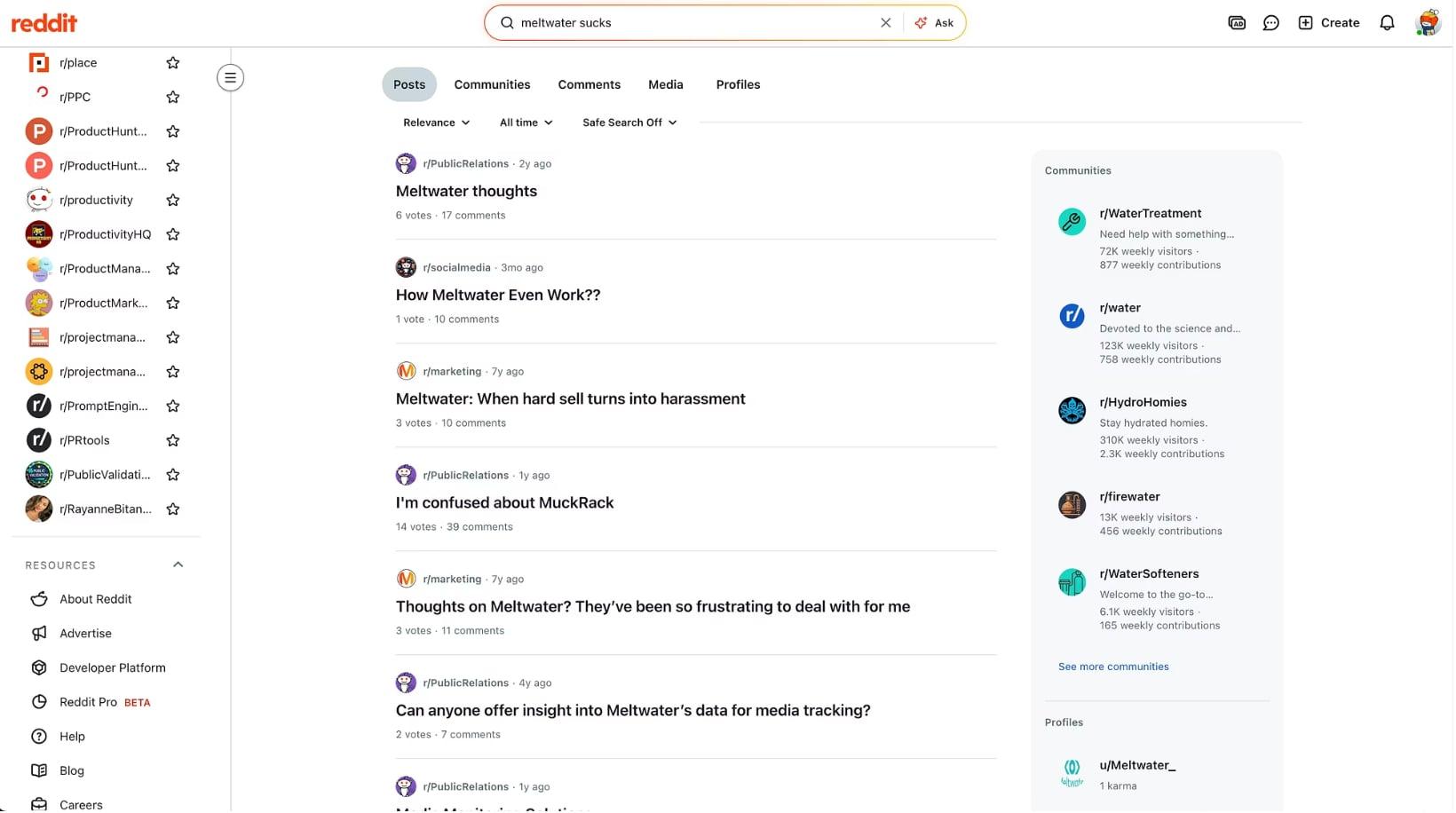
Worked example: Reddit subreddits

Searching Reddit for posts about an existing product, and reading the threads that come back.

This is the simplest research method in the playbook, and it works in almost any niche. Here is the process behind the screenshot above.

Problems. Search for existing apps or generic phrases that describe the problem, for example on Reddit, Facebook groups, and other communities. Search both by product name and by the situation, such as "how do I track" or "struggling with."

Research. Read the comments and ask questions via replies. When someone describes a problem, reply with a genuine question: "What have you tried so far?" or "What is the most annoying part?" The replies are your free interviews.

Lists. Make a list of all the pain points and issues regarding potential solutions. Group similar complaints. Mark which ones people say cost them time or money.

Idea(s). Use AI plus your own intuition to narrow down to the idea. Paste your list into an AI chat, ask for patterns and gaps, and then use your own judgment about which one you would enjoy solving.

Here is what a few rows of a pain log might look like:

Quote (shortened)SourcePain (1 to 3)Current workaround
"I spend every Friday copying numbers between tools"Subreddit thread3Manual spreadsheet
"The tool I use does not support my workflow"Product review2Paying for two tools
"Wish there was a simple way to share this with clients"X post2Emailing PDFs

Prompts you can copy

Find patterns in your pain log

Here are 30 quotes from people describing problems with [topic].
Group them into themes. For each theme, give me: a one-line summary,
how many quotes support it, the strongest quote, and what people do today
to cope. Then tell me which theme looks most urgent and why.

Stress-test a wedge

My idea: I help [who] do [job] so they can [outcome], without [pain].
Act as a skeptical investor. Give me the 7 strongest reasons this could fail,
the 3 competitors or substitutes I am most likely overlooking, and the
cheapest experiment I could run in one week to test the riskiest assumption.

Prepare customer interviews

I am interviewing [type of person] about [problem]. Write 10 interview
questions about the past, not the future. Avoid leading questions and avoid
pitching my idea. Include a follow-up probe for each question.

Common mistakes

  • Falling in love with the solution. Start from the problem. If you cannot describe the problem without describing your product, you do not understand it yet.
  • Only asking friends. Friends want to be kind. Strangers with the problem will tell you the truth.
  • Confusing complaints with willingness to pay. Many people complain. Fewer are already spending time or money to fix it. Look for the second group.
  • Going too broad. A big market is not a wedge. Pick a small group you can reach.
  • Researching forever. Set a deadline. Two weeks of focused research is usually plenty to decide.

Checklist

  • Picked a space where I have an edge or real interest
  • Logged at least 30 real pain signals with links
  • Grouped them into themes and counted repeats
  • Stress-tested the top candidates with AI
  • Wrote my wedge sentence with specifics
  • Spoke to at least five real people with the problem
  • Decided: build, narrow, or drop

You're done when you can name one specific person, one specific problem, and the evidence that they already care enough to act.

PHASE 2

Build: Ship Your MVP

Speed is your unfair advantage. Use modern AI-assisted dev tools to go from zero to shipped in days, not months. Focus on the core loop; everything else is secondary.

Why this phase matters

An MVP, or minimum viable product, is the smallest version of your product that delivers the core value to a real user. It is not a prototype and it is not a demo. Someone should be able to sign up, do the one thing your product exists to do, and get the result.

Vibe coding tools let a single person build things that used to need a team. That makes scope the main danger. The temptation is to keep adding because adding is easy. Your job in this phase is to protect the core loop: the single repeated action that delivers value. For a screenshot tool it might be "upload, get the edited image." For a research tool it might be "paste a link, get the summary." Build that, make it reliable, and leave everything else for later.

How to do it

  1. Write a one-page spec. Describe the user, the problem, the core loop, the three to five must-have features, and a "not now" list. The "not now" list matters most, because it is what you point to when you are tempted to add more.
  2. Define the core loop in one sentence. "A [user] can [action] and get [result] in under [time]." If it takes a paragraph, it is too complicated for an MVP.
  3. Choose a default stack and stay with it. A good starting point is an AI vibe coding platform for the app, Supabase for the backend, GitHub for version control, and Stripe for payments. Do not spend days comparing tools.
  4. Build in layers. Go in this order: landing page, sign-up and login, the core loop, payments, then settings and polish. Do not start on a layer until the one before it works.
  5. Prompt in small steps. One change per prompt works better than ten. Describe the outcome you want, add constraints, and ask the AI to explain its plan before it edits anything. Small steps are easier to review and easier to undo.
  6. Connect the backend early. Link your database and authentication before you have much data to migrate. Turn on row-level security so each user can only see their own data, and keep secret keys out of front-end code.
  7. Add payments in test mode. Create your products and prices, run the full checkout with test cards, and check that the right things happen after payment: access is granted, receipts are sent, and cancellations work.
  8. Test like a stranger. Open the product in a private window on your phone. Try the happy path, then break it: empty fields, wrong passwords, slow connections, the back button. Fix what confuses you before it confuses anyone else.
  9. Ship to a real URL. Connect a custom domain, add basic privacy and terms pages, and make sure error pages are friendly. Shipping is a milestone, not a finish line.
  10. Know when to graduate. When you hit the limits of your platform, such as complex logic, performance, or a large refactor, move the code to a more advanced environment like Cursor or Codex. Because the project already lives on GitHub, you can move without starting over.

Your tool stack

AI vibe code platforms: Cursor, Lovable, v0, and Bolt

What they are for: generating, editing, and scaffolding code with AI at your side.

How to use them well: platforms like Lovable, v0, and Bolt are strongest for getting a working app on screen quickly, especially if you are not a developer. Cursor sits closer to a traditional coding environment and gives you more control. Pick one primary tool and learn its habits: how it handles prompts, how to roll back, how to see what changed.

Watch out for: large, vague prompts that rewrite half your app. Review changes, test after every step, and use version history.

Dev environments: Codex and GitHub

What they are for: spinning up projects instantly and collaborating with version control from day one.

How to use them well: connect your project to GitHub as early as possible. Every working state becomes a restore point. Use Codex or a similar coding agent when you need deeper changes, bug fixes across many files, or tasks that are hard to express in a visual builder.

Watch out for: committing secrets. Keys and passwords belong in environment variables, never in the repository.

Backend and payments: Supabase and Stripe

What they are for: plugging in authentication, databases, and payments without reinventing the wheel.

How to use them well: let Supabase handle accounts and data, and Stripe handle money. Start in Stripe's test mode and use test cards until every path works. Keep your data model simple. You can always add tables later.

Watch out for: forgetting access rules on your database, and skipping webhook handling for payments. Both create real problems that are hard to spot until a customer hits them.

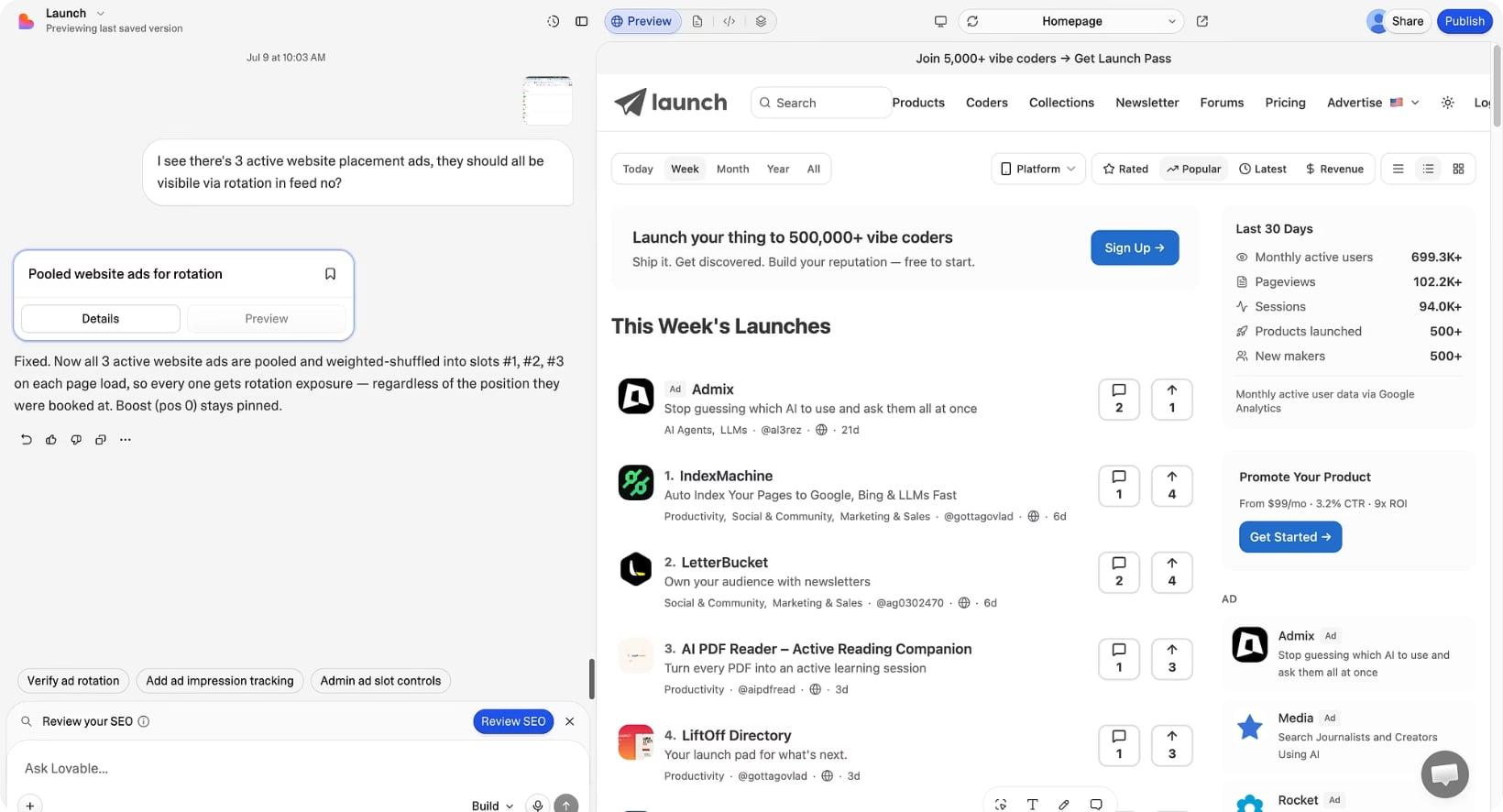
Worked example: Lovable.com

Building an MVP with an AI vibe coding platform, with the chat on one side and the live product preview on the other.

This is the exact path used to build multiple MVP apps with Lovable. It works well for a first product because it keeps you in one place.

Vibe coding platform. Sign up to Lovable, which is great for MVPs. Describe your product in plain language, then refine it one change at a time. Use the preview to click through as a user would.

Backend. Sign up to Supabase and GitHub, then link both to your Lovable project. Supabase gives you accounts and a database. GitHub gives you version control and a way to move the code elsewhere later.

Payments. Add Stripe to accept payments. Start in test mode, check the whole flow, and only then switch to live keys.

Advanced. Use more advanced AI coding environments when you are ready, for example Codex. You will know you are ready when the platform is no longer the fastest way to make the change you need.

Prompts you can copy

Kick off the project

I am building [product] for [who]. The core loop is: a user can [action]
and get [result]. Must-haves: [list]. Not now: [list].
First, do not write code. Propose the pages, the data model, and the order
you would build things in. Ask me questions if anything is unclear.

Make one safe change

Make this one change only: [describe the outcome]. Do not modify anything
else. Before editing, tell me which files or components you will touch and
why. After the change, list exactly what you changed.

Fix a bug

Here is the problem: [what happens] when I [steps]. I expected [expected].
First explain the most likely cause. Then propose the smallest fix.
Do not refactor unrelated code.

Review for security

Review this project for common security problems: exposed secret keys,
missing database access rules, users able to see each other's data, and
unvalidated inputs. List each issue, how serious it is, and how to fix it.

Common mistakes

  • Building without a spec. Without a "not now" list, scope grows every day.
  • Big, vague prompts. "Make it better" produces unpredictable rewrites. Ask for one clear change at a time.
  • No version control. If you cannot roll back, every experiment is risky.
  • Leaving secrets in code. Keys belong in environment variables.
  • Skipping mobile. Many people will first see your product on a phone.
  • Polishing before proving. A rough product people use beats a beautiful product nobody has seen.

Checklist

  • One-page spec with a "not now" list
  • Core loop defined in a single sentence
  • Backend connected, with access rules turned on
  • Project saved to GitHub
  • Payments working end to end in test mode
  • Tested on a phone, in a private window, as a stranger
  • Live on a real URL with privacy and terms pages

You're done when a stranger can sign up, complete the core loop, and pay you, without any help from you.

PHASE 3

Brand: Turn MVP into a Trusted Product

Great products fail without a great story. Rocket gives founders the brand strategy, positioning, and launch assets to show up like a company, not a side project.

Why this phase matters

People decide quickly whether to trust a product. Before they read a feature list, they react to the headline, the design, and the feel of the page. A clear brand tells them in seconds who the product is for, what it does, and why it is different. An unclear one makes them leave, however good the product is.

Brand is not just a logo. It is clarity: a consistent answer to "what is this and why should I care?" repeated everywhere your product appears. Good brand work also makes everything after it easier. Launch posts, press pitches, and content all become simpler to write once the words are settled.

What a brand consists of

A brand has four parts that work together:

  • Strategy. Brand strategy and positioning: who you serve, what you do, and why you win.
  • Copy. Tagline, naming, and the words on your landing page and in your product descriptions.
  • Visuals. The look: screenshots, social assets, and the overall style.
  • Launch. The launch assets and checklist that put your brand in front of people.

How to do it

  1. Write your positioning. Use this template: "For [who] who [need], [product] is a [category] that [main benefit]. Unlike [alternative], we [difference]." Define who you are, who you serve, and why you win.
  2. Study the alternatives. Open the homepages of five competitors or neighbors. Note their headlines, taglines, and promises. You are looking for the gap: something true about you that they do not say.
  3. Choose the name carefully. A good name is short, easy to spell and say, and available as a domain and social handle. Say it aloud, type it, and check that it does not mean something unfortunate in another language.
  4. Craft the tagline. Write 10 candidates. A strong tagline says what the product is, who it is for, or what result it gives. Pick three and test them on people who match your audience.
  5. Build a messaging hierarchy. From top to bottom: the tagline, a one-sentence value proposition, three key benefits, proof, and a call to action. Everything you write later should trace back to this.
  6. Structure the landing page. A reliable order is: hero with a clear headline and call to action, social proof, the problem, how it works, features framed as benefits, screenshots or a demo, pricing, frequently asked questions, and a final call to action.
  7. Keep the visual identity simple. Choose one logo, one or two fonts, two or three colors, and one consistent screenshot style. Consistency makes a small product look established.
  8. Make launch assets. Create a hero graphic, annotated screenshots, a social share image, a short demo video or GIF, and a founder bio.
  9. Write your descriptions at three lengths. A one-line description, a 50-word version, and a 150-word version. You will use them everywhere from directories to press pitches.
  10. Finish with a launch checklist. List every asset, every link, and every account you need on launch day, and check each one.

Your tool stack

Rocket

What it is for: brand strategy, positioning, and launch assets, so a new product shows up like a company instead of a side project.

How to use it well: use it early, before you write landing page copy, so the words and visuals share one foundation.

AI chat tools

What they are for: drafting taglines, positioning statements, and landing page copy at speed.

How to use them well: give them your positioning and a clear audience, then ask for many options. Edit the best ones heavily. Your voice should be recognizable.

Watch out for: generic copy. If a line could describe a hundred other products, rewrite it with something specific.

Design and screenshot tools

What they are for: logos, social images, and clean product screenshots.

How to use them well: use templates to move quickly, and build one reusable layout for all your social images. Annotate screenshots to show the single benefit each one proves.

Watch out for: too many styles. Pick one and stay with it.

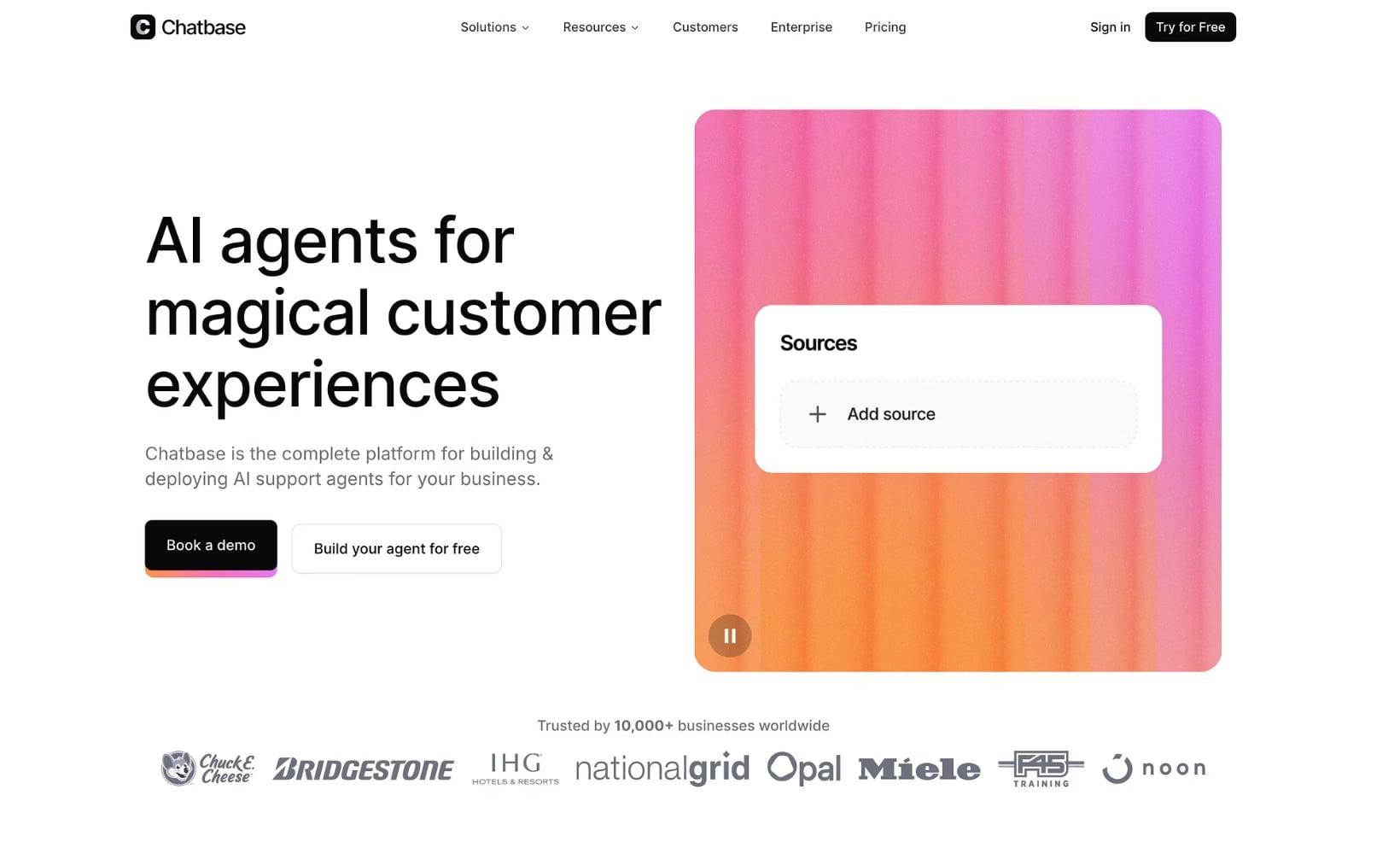
Worked example: Chatbase homepage

A homepage with a clear headline, two calls to action, a strong visual, and customer logos.

Chatbase is a good example of a brand that explains itself instantly. Look at the homepage and notice how each part of the brand shows up.

Brand positioning. Chatbase is the brand for AI chat agents. The category is clear before you read anything else.

Tagline. "AI agents for magical customer experiences." It names the product type and the result in a few words.

Key messaging. Chatbase is the complete platform for building and deploying AI support agents for your business. The supporting line explains the offer in one sentence.

Assets. Launch assets such as the hero graphic and customer logos. Notice the two calls to action, a low-commitment one and a higher-commitment one, and the row of customer logos that adds trust at a glance.

When you review your own homepage, ask three questions: can a stranger tell what this is in five seconds, can they tell who it is for, and do they know what to click next?

Prompts you can copy

Draft positioning

Product: [describe]. Audience: [who]. Main alternatives: [list].
Write 5 positioning statements using this template: "For [who] who [need],
[product] is a [category] that [benefit]. Unlike [alternative], we [difference]."
Make each one meaningfully different. Flag which is the most specific.

Generate taglines

Write 20 taglines for [product], a [category] for [audience]. Keep each
under 8 words. Group them by approach: result-focused, audience-focused,
and category-focused. Avoid cliches such as "supercharge" and "unlock".

Write landing page copy

Using this positioning: [paste], write landing page copy with a hero headline,
subheadline, three benefit blocks, a short "how it works" in three steps,
five frequently asked questions, and a closing call to action.
Use plain language and short sentences.

Write the three descriptions

Write three descriptions of [product]: one line, 50 words, and 150 words.
They should all say the same core thing in a different amount of space.

Common mistakes

  • Starting with the logo. Visuals come after positioning, not before.
  • Clever but unclear taglines. Clear beats clever every time.
  • Describing features instead of benefits. People buy outcomes.
  • Copying competitors' language. If you sound the same, you are the same.
  • Inconsistent presentation. Different names, tones, and colors across channels make you look unreliable.

Checklist

  • Positioning statement written
  • Five competitor homepages reviewed
  • Name chosen, with domain and handles secured
  • Tagline tested with real people
  • Landing page follows a clear structure
  • Simple visual identity: logo, fonts, colors
  • Hero graphic, screenshots, and share image ready
  • Descriptions at three lengths written
  • Launch checklist complete

You're done when a stranger can read your homepage and tell you what the product is, who it is for, and why it is better than the alternative.

PHASE 4

Launch: Get Discovered

Launch day is not luck; it's a system. Build your presence across the right platforms, optimize for discovery, and activate communities before you hit publish.

Why this phase matters

Most launches fail quietly, not because the product is bad but because nobody knew it existed. People who seem to get lucky on launch day have usually done weeks of work beforehand: they built relationships, prepared their assets, and lined up the first people to show up.

A launch is also not a single day. It is a window of about two weeks around a peak. The peak brings attention, the days after convert some of it into users, and what you learn feeds everything else in this playbook. Treat launch day as the start of a process, not a finish line.

How to do it

Work backward from your launch date.

About 30 days before

  1. Pick your launch date and tell a few people. A date creates urgency.
  2. Get a landing page live that explains the product and collects emails.
  3. Polish your founder profile on X and LinkedIn, covered in the next section.

About 3 weeks before

  1. Start showing up in the communities where your audience spends time. Be useful: answer questions, share what you are learning, and comment on other people's work. Do not pitch yet.
  2. Build a list of 50 to 100 people to tell about your launch: beta users, friends in your space, creators, and anyone who has helped you.

About 2 weeks before

  1. Finish your launch assets: screenshots, demo video, descriptions, and share images.
  2. Draft your posts for every platform. Each should be different, written for that audience.
  3. Set up analytics and tracking links so you know which channel sends which users. The Analytics chapter covers this.

About 1 week before

  1. Reach out to your list personally. Ask for feedback and, where the platform allows it, for support on launch day. Never ask for fake engagement.
  2. Test everything: sign-up, onboarding, payments, and what happens under a spike in traffic.

Launch day

  1. Publish early. Post on each platform, tailored to its audience, and stay online all day.
  2. Reply to every comment quickly. Early engagement keeps conversations alive and builds trust.
  3. Share small updates through the day: milestones, thank-yous, and answers to common questions.
  4. Watch for bugs and fix them fast. People notice speed.

The week after

  1. Thank everyone who helped, publicly and privately.
  2. Follow up with every new sign-up and ask what they were hoping to do.
  3. Write up what you learned and share it. A launch recap is also content.

Platforms and how to approach each

  • Product Hunt. A community built around discovering new products. Prepare a clear tagline, a strong first image, and a short maker comment. Join the community before launch day and read the current guidelines on how to run a launch.
  • Hacker News. A technical, skeptical audience. Use a "Show HN" post if it fits, be plain and factual, and be ready for blunt feedback. Avoid hype.
  • Reddit. Each subreddit has its own rules. Read them first. Share what you built and what you learned, not an advertisement, and be ready to answer questions.
  • Twitter/X. Tell the story: why you built it, what happened, and a short demo. Quote the people who give feedback.
  • LinkedIn. Write for professionals. Lead with the problem and the result.
  • Indie Hackers. A community that values honest build stories, numbers, and lessons.

Landing page, SEO, and your founder profile

Landing page. This is your main funnel. It should be optimized for conversion and first impressions. Put the key promise and a single call to action at the top, keep the page fast, and make it work well on a phone.

SEO and discovery. Rank for the right keywords and get found by the right people. Start simple: research the phrases people use to describe the problem, give each important phrase its own page, write clear titles and descriptions, add a sitemap, and set up Google Search Console. Links from other sites help too, which is one reason PR matters.

Founder profile. Your story is a differentiator. Build a founder profile that earns trust and drives clicks. Use a clear photo, a bio that says what you build and for whom, a pinned post about the product, and a link in your bio. People often check the person before they check the product.

Your tool stack

Landing page

What it is for: conversion and first impressions. How to use it well: one promise, one call to action, one screenshot or demo that proves it. Watch out for: long pages that bury the main action.

SEO and discovery

What it is for: being found by the right people through search. How to use it well: write for a real phrase people search for, and answer it better than the pages that already rank. Watch out for: keyword stuffing and thin pages.

Community platforms

What they are for: Product Hunt, Hacker News, Reddit, and Indie Hackers each activate a different audience. How to use them well: write a tailored strategy and post for each. Watch out for: copying the same text everywhere, and ignoring each platform's rules.

Founder profile

What it is for: trust. How to use it well: keep it consistent across platforms and make it easy to see what you are working on. Watch out for: a blank or outdated profile on the day people arrive.

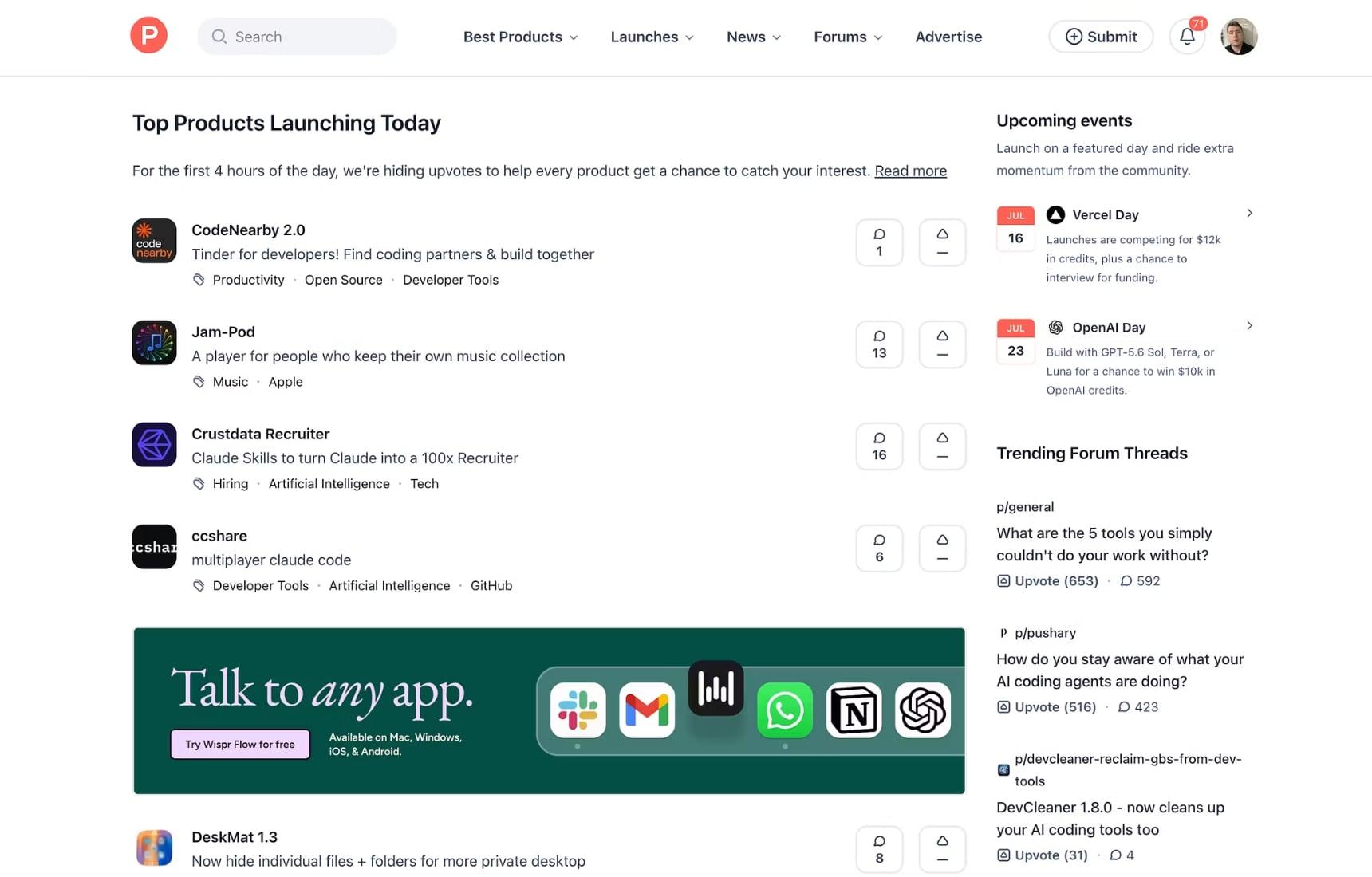
Worked example: Product Hunt (obviously)

A product discovery platform showing the top products launching today.

Use this structure as a launch log. It gives you a plan before launch day and a record of results after it.

Platforms launched on. Product Hunt, Hacker News, Reddit subreddits (for example /r/saas and /r/startups), Twitter/X, and LinkedIn.

Community activation. Early adopter engagement, pre-launch outreach to influencers and beta users, and engagement on launch day posts.

Initial traction. Sign-ups and users acquired, website traffic, and mentions and shares.

Launch day results. Key metrics achieved, learnings, and next steps.

A simple way to track it:

ChannelPost linkVisitsSign-upsNotes
Product Hunt
Hacker News
Reddit
X
LinkedIn

Prompts you can copy

Draft platform-specific posts

Here is my product and what I learned building it: [paste].
Write launch posts for Product Hunt, Hacker News (Show HN), a subreddit
for [audience], X, and LinkedIn. Make each distinct in tone and structure.
No hype words. Include one honest limitation of the product in each.

Personal outreach message

Write a short, warm message asking [type of person] to take a look at my
launch on [date]. I want feedback and, only if they genuinely like it,
their support. Keep it under 80 words. Make it easy to say no.

SEO page outline

I want a page that ranks for "[search phrase]". Give me a title tag,
meta description, an outline with H2s, and the questions this page must
answer to beat the pages that already rank. Include what to link to.

Common mistakes

  • Launching with no audience. The week before matters more than launch day.
  • Asking for upvotes in bulk. Many platforms penalize it. Ask for feedback instead.
  • Using the same post everywhere. Each community expects something different.
  • Ignoring comments. Replies are free marketing and the best feedback you will get.
  • Launching something broken. Test the full path before you go public.
  • Treating launch as a one-day event. Plan the follow-up as carefully as the launch.

Checklist

  • Launch date chosen and shared
  • Landing page live with a clear call to action
  • Founder profile polished on X and LinkedIn
  • Presence built in the relevant communities
  • List of 50 to 100 people to notify
  • Assets and platform-specific posts ready
  • Tracking links and analytics working
  • Launch log set up to record results
  • Follow-up plan for the week after launch

You're done when you have launched on more than one platform, replied to every comment, and recorded what each channel delivered.

PHASE 5

PR: Get People Talking

Press doesn't happen by accident. Build relationships with journalists, creators, and influencers then run structured outreach campaigns that earn coverage and build credibility.

Why this phase matters

When you say your product is good, it is marketing. When someone else says it, it is proof. Press coverage, creator mentions, and third-party reviews carry credibility that your own posts cannot. They also send traffic, add links that help search rankings, and make every later conversation easier, because people can see that others have taken notice.

Key insight: A single well-placed media mention can outperform weeks of paid ads. Build the relationships early.

The media strategy

Your media strategy has four parts:

  1. Journalists. Identify and pitch reporters who cover your space.
  2. Creators and influencers. Partner with voices your audience already trusts.
  3. Outreach and email templates. Personalized, scalable outreach that gets replies.
  4. Campaigns. Coordinate press drops with launch timing for maximum impact.

How to do it

  1. Find your angle. Journalists do not cover products, they cover stories. Strong angles include original data, a clear trend, a surprising founder story, a contrarian opinion, or a launch tied to something already in the news. Test your angle against four questions: is it new, is it timely, is it relevant to their readers, and can you prove it?
  2. Build a media list. Aim for 30 to 50 targets in tiers: a few dream outlets, a larger group of niche publications, newsletters, and podcasts, and creators in your space. For each, note their name, what they have written recently, how to contact them, and why they would care.
  3. Warm up the relationship. Before you pitch, read their work, share it with a thoughtful comment, and offer something useful. Relationships that exist before a pitch convert far better than cold messages.
  4. Write a short pitch. Keep it under 150 words. Use a clear subject line, open with the story rather than the product, explain why now, offer proof, and make it easy to say yes. Include a link to a press page with assets.
  5. Follow up once. Wait three to five days and send one short follow-up. If you hear nothing, move on and keep the relationship alive in other ways.
  6. Work with creators. Choose fit over reach. A small creator who speaks to exactly your audience beats a large one who does not. Offer early access or a fair arrangement, be clear about expectations, and make sure any paid partnership is disclosed.
  7. Coordinate the campaign. Line up coverage, creator posts, and community posts around your launch. Where an outlet wants early access, agree on timing in advance.
  8. Create a press page. Include a short description, founder bio, high-resolution logos and screenshots, key facts, and a contact. Make it effortless for someone to write about you.
  9. Track and thank. Record coverage, referral traffic, and links. Thank every person who featured you, and keep them updated on what happens next.

Your tool stack

Media lists and journalist research

What they are for: finding the right people to pitch. A journalist and influencer database, such as Media (trymedia.ai), can save hours. How to use them well: filter for people who have recently covered your topic, then read their latest work before you pitch. Watch out for: stale contacts and mass-emailing a list.

Email and outreach templates

What they are for: sending personalized outreach at scale without sounding like a template. How to use them well: keep the first two lines unique to each person and reuse the rest. Watch out for: obvious automation. Anyone can tell.

Press page and assets

What they are for: removing friction. How to use them well: one link with everything a writer needs. Watch out for: outdated screenshots and broken links.

Worked example: Stripe internal data

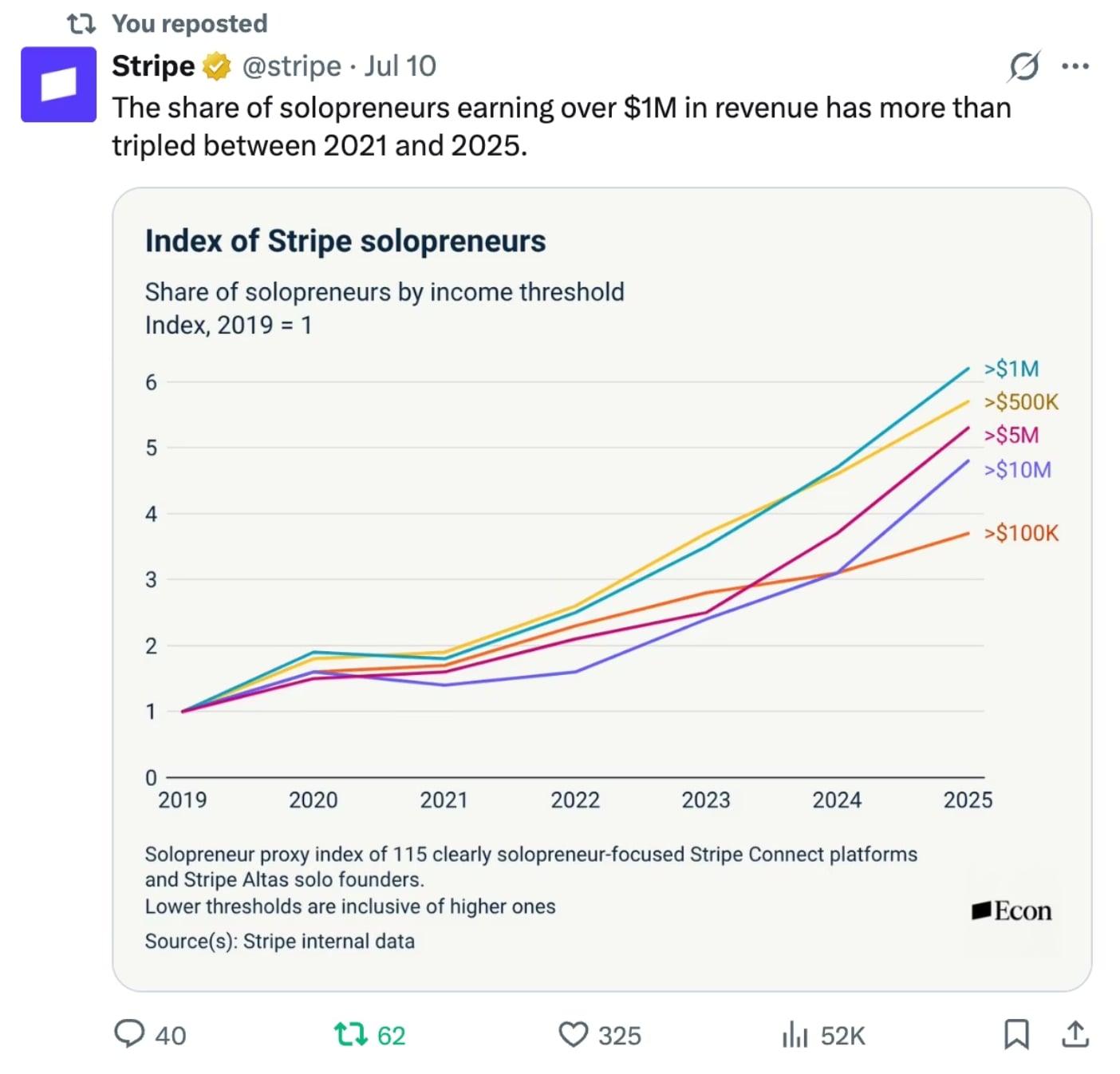
A post sharing a chart built from the company's own data.

Companies like Stripe have something most startups overlook: data that only they can see. A chart built from that data becomes content that journalists, creators, and customers want to share. The post above shares an index of solopreneurs earning over a million dollars in revenue, built from internal data.

You can use the same three steps:

Identify data. Every startup produces data, so access yours. Look at sign-ups, usage patterns, common questions, and trends across your customers.

Turn data into content. Create engaging content from the data, such as tweets, infographics, and videos. Lead with one surprising finding, show it as a simple chart, and explain what it means in one sentence.

Distribute. Share the content on your personal and brand accounts. Experiment across different social media channels, email, and wherever works best for your startup. Offer the numbers to journalists who cover your space.

Good data stories share a few traits: they use real numbers, they are simple to understand at a glance, they say something people did not already know, and they cite the source. Protect customers by using only aggregated and anonymized figures, and check your privacy policy first.

Prompts you can copy

Find your angle

Here is my product and what I know about its users: [paste]. Suggest 10
story angles a journalist covering [beat] might find newsworthy. For each,
tell me what proof I would need and which type of outlet would care most.

Write the pitch

Write a pitch email to [name] at [outlet], who recently wrote [article].
My story: [angle]. Proof: [data or result]. Keep it under 150 words.
Open with the story, not the product. Make one clear, easy ask.

Turn data into content

Here is a data set from my product: [paste]. Find the three most surprising
findings. For each, write a tweet, a LinkedIn post, and a one-sentence chart
title. Flag anything that might identify a customer.

Common mistakes

  • Pitching your product instead of a story. Journalists want a reason their readers care.
  • Mass emailing. Generic pitches are ignored and can hurt your reputation.
  • No proof. Claims without numbers or examples do not travel.
  • Choosing reach over fit. An audience that matches yours is worth more than a big one that does not.
  • Following up too often. One polite follow-up is enough.
  • Forgetting to build relationships first. Cold outreach works far better once they know who you are.

Checklist

  • A clear angle with proof
  • Media list of 30 to 50 targets, in tiers
  • Relationships warmed before pitching
  • Pitch email under 150 words
  • Press page with assets and contact
  • Creator outreach planned, with disclosure agreed
  • Campaign timed around the launch
  • Coverage and referral traffic tracked

You're done when you have sent personalized pitches, secured at least one third-party mention, and know which angles worked.

PHASE 6

Content: Stay Visible

Launch day is just the beginning. A consistent content engine keeps your product top of mind, builds audience trust, and compounds over time all the way to your next launch.

Why this phase matters

Attention fades quickly. A launch can bring a wave of visitors, but without a steady reason for people to return, the wave passes. Content is how you stay in front of the people who matter: you show your thinking, demonstrate your product, and build an audience that exists independently of any platform.

Content also compounds. A post is seen once, but a useful one keeps working through search, shares, and replies, and it builds a body of work people can trust. The three habits that make this sustainable are to repurpose what you make, schedule it so consistency never depends on motivation, and distribute it where your audience already is.

How to do it

  1. Choose content pillars. Pick three or four topics you will return to again and again. For a founder these might be your product, what you are learning, your industry, and the behind-the-scenes of building. Pillars stop you from staring at a blank page and help people understand what you are about.
  2. Pick two main platforms. Go deep on two where your audience spends time. Use the others by repurposing what you already made.
  3. Set a posting frequency you can keep. Define how often you will publish on each channel, whether that is X, Instagram, TikTok, YouTube, or others. A modest rhythm kept for a year beats a heroic one that lasts three weeks.
  4. Capture ideas constantly. Keep a running list: questions customers ask, mistakes you made, numbers, screenshots, small wins. This is your raw material.
  5. Write strong hooks. The first line decides whether people keep going. Reliable openers include a surprising result, a specific mistake, a contrarian view, or a clear promise ("How I got X without Y").
  6. Use proven formats. Before and after, lessons learned, teardown of a product or page, behind-the-scenes, a short tutorial, and a clear opinion all work.
  7. Repurpose everything. One long piece becomes a thread, three short posts, a newsletter, a short video, a carousel, and a quote graphic. Create once and publish many times.
  8. Schedule in batches. Set aside one or two hours per week to create and queue content. Consistency should never depend on how you feel that day.
  9. Engage. Reply to comments quickly, especially in the first hour. Spend time commenting on other people's posts too. Distribution is a conversation.
  10. Review weekly. Look at what performed best. Identify top performing content, then double down on content that outperforms and, if possible, put paid ads behind it.

Repurpose, schedule, distribute

Repurpose. Turn one piece of content into posts, threads, reels, and newsletters. A single recorded conversation can become a long video, several short clips, quotes, a written summary, and a newsletter.

Schedule. Batch-create and schedule posts so consistency never depends on motivation. Plan the week in one sitting, queue it up, and use your remaining time to engage.

Distribute. Publish across X, LinkedIn, Threads, Instagram, and TikTok, and meet your audience where they are. Adapt the format and tone to each platform instead of pasting the same post everywhere.

Your tool stack

Writing and ideation

What they are for: turning raw notes into drafts. How to use them well: give AI your real experiences and your tone, and ask for options. Watch out for: generic posts. Add a specific detail only you could know.

Scheduling tools

What they are for: queuing posts across platforms. How to use them well: schedule a week at a time, and leave room for spontaneous posts. Watch out for: scheduling and then disappearing. Be present when posts go live.

Video and clip tools

What they are for: cutting long videos into short clips and adding captions. How to use them well: put the hook in the first second and add on-screen text. Watch out for: polish that slows you down. Many top posts are simple.

Social platforms

What they are for: reaching your audience on X, LinkedIn, Threads, Instagram, TikTok, and YouTube. How to use them well: learn each platform's native format and tone. Watch out for: spreading too thin.

Worked example: Cluely founder Roy Lee

A short-form video with a bold on-screen hook and a direct claim to the camera.

The post above is a short vertical video with a loud on-screen hook that makes you stop scrolling. Here is how to break down this kind of content, using four ideas from the example.

Content pillars. Design content pillars to define your main topics and themes. Cluely is focused on startups, ragebait, and founders. Notice how every piece fits into those themes, which makes the account easy to understand and follow.

Posting frequency. Develop a posting frequency to specify how often you publish content across channels, whether that is X, Instagram, TikTok, YouTube, or others.

Best content. Identify top performing content, then double down on content that outperforms and put paid ads behind it if possible.

Content growth. Drive audience growth by outlining content's role in reaching and engaging new users, and expand from there.

One caution: attention-first content, especially anything built to provoke, can grow an audience fast but also divides it. Decide how much of that approach fits your brand and the kind of customers you want.

A simple weekly rhythm to start from:

DayTask
MondayPick one idea from your list and write the long version
TuesdayTurn it into a thread or carousel and a short video
WednesdayPublish and engage for the first hour
ThursdayPublish a second piece, such as a build update
FridayReview numbers and note what worked

Prompts you can copy

Build content pillars

I build [product] for [audience]. Suggest 4 content pillars that would
make me worth following. For each, give a one-line description, 10 post
ideas, and the format that suits it best. Make them specific to my work,
not generic business advice.

Repurpose a long piece

Here is a long piece of content: [paste]. Create: 1 thread of 7 posts,
3 standalone short posts, a 150-word newsletter intro, and a 30-second
video script. Each should open with a different hook.

Write better hooks

Here is a post draft: [paste]. Write 10 alternative opening lines using
these approaches: surprising result, specific mistake, contrarian view,
clear promise, and a question. Keep each under 15 words.

Common mistakes

  • Posting without pillars. Random topics build a random audience.
  • Inconsistency. Bursts followed by silence reset your momentum.
  • Only promoting. Mix useful and personal content with product posts.
  • Ignoring comments. Conversation drives reach and trust.
  • Not repurposing. Making everything from scratch burns out creators.
  • Chasing every platform. Do two well before adding a third.

Checklist

  • Three or four content pillars defined
  • Two primary platforms chosen
  • Posting frequency I can sustain
  • Idea list I add to every week
  • Repurposing routine in place
  • Weekly batch session scheduled
  • Weekly review of top content

You're done when you have a repeatable weekly routine, a queue of upcoming content, and you know which posts perform best.
PHASE 7

Analytics: Understand What Worked

Data closes the loop. Use analytics to see what drove traffic, what converted, and what to double down on then feed those insights directly into your next build cycle.

Why this phase matters

Without data, every decision is a guess, and you cannot tell which of your efforts worked. With it, you can see where visitors came from, where they dropped off, and which actions led to paying customers. That turns marketing and product work from hope into experiments.

The aim is not to track everything. It is to answer a few clear questions: Where do people come from? Do they sign up? Do they use the product? Do they come back? Do they pay? Every answer points to what to fix or repeat.

How to do it

  1. Choose a handful of metrics. Pick one main goal and a few supporting numbers across the customer journey: traffic, sign-ups, activation (people who complete the core loop), retention, and revenue. Avoid vanity metrics that look good but change nothing.
  2. Write a tracking plan. List the events you need: page view, sign-up, first core action, checkout started, purchase, and return visit. Name them consistently.
  3. Use consistent tracking links. Add campaign parameters (UTMs) to every link you share, such as source, medium, and campaign. Without them, you cannot tell which post or channel worked.
  4. Install and test. Set up your tools, then test them yourself by signing up and checking that every event appears. Review privacy rules and consent requirements for the regions you serve.
  5. Build one weekly dashboard. Keep one page with traffic by source, conversion rates at each step, and revenue. If a number does not lead to a decision, remove it.
  6. Analyze the funnel. Find where most people drop. A large drop between visit and sign-up points to your message or landing page. A drop after sign-up points to onboarding or product value.
  7. Read the search data. In Google Search Console, look at which queries bring impressions and clicks, and which pages have high impressions but low click-through. These are quick opportunities.
  8. Add qualitative signals. Numbers show what happened, people tell you why. Read support messages, run short surveys, and watch a few session recordings.
  9. Run one experiment at a time. State a hypothesis, change one thing, run it long enough to see a result, and decide. Examples: a new headline, a shorter sign-up, a different price.
  10. Hold a weekly review. Spend 30 minutes reviewing the dashboard, noting what you learned, and choosing the next experiment. Then feed those insights into your next build cycle.

Your tool stack

GA4

What it is for: traffic sources, user behavior, and conversion funnels. How to use it well: define your key events as conversions and check acquisition reports for which channels perform. Watch out for: complicated reports. Start with a few views you understand.

PostHog

What it is for: product analytics and feature usage tracking. How to use it well: track the events in your core loop and build a simple funnel from sign-up to first success. Watch out for: tracking too many events from day one.

Google Search Console

What it is for: search performance and indexing insights. How to use it well: check which queries and pages earn impressions, and improve titles and content for the ones with low click-through. Watch out for: ignoring indexing issues that keep pages out of search.

Ahrefs and Plausible

What they are for: SEO intelligence (Ahrefs) and privacy-friendly web analytics (Plausible). How to use them well: use Ahrefs to study backlinks and competitors, and Plausible for a clean, lightweight view of traffic. Watch out for: paying for more tools than you will use. Start with one or two.

Worked example: Ahrefs SEO data

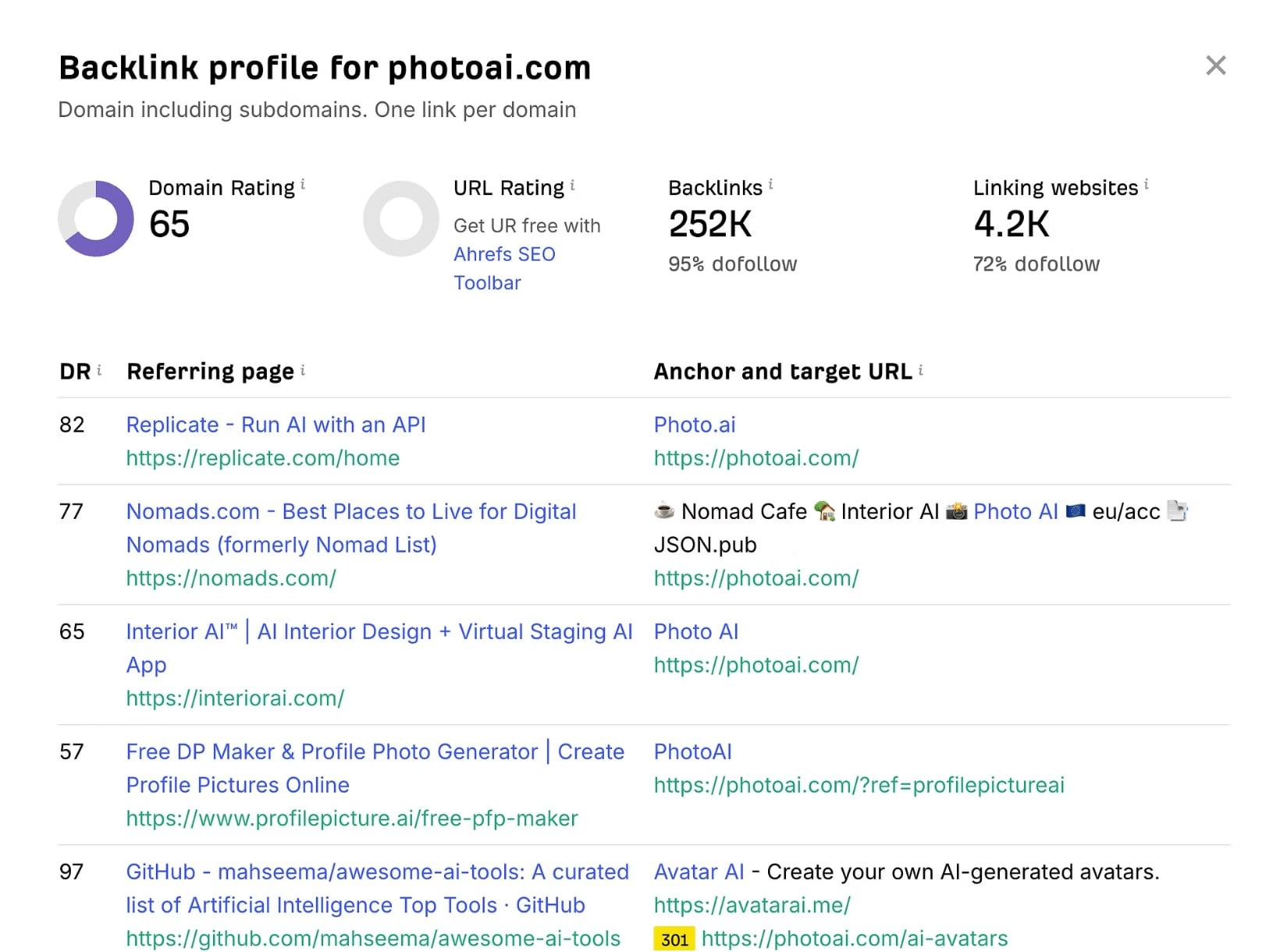
A backlink profile showing domain rating, backlinks, linking websites, and the pages that link to the site.

The screenshot shows a site's backlink profile: its domain rating, the number of backlinks, the number of linking websites, and which pages link to it. This kind of report tells you which sites send authority to you and what kinds of content earn links. Use this four-part template for your own review:

Traffic sources. For example: organic search, social, and paid. Which channels bring the most visitors, and which bring the best ones?

Conversion rate. For example, 5% or 10% from sign-up to paid. Where does the funnel leak?

Key learnings. For example, feature X drives Y engagement. What did people actually do?

Next iteration focus. For example, A/B test pricing or improve onboarding. What is the one thing to try next?

Fill it in every week:

QuestionThis week
Biggest traffic source
Sign-up to paid conversion
Biggest drop-off
What I learned
Next experiment

Close the loop

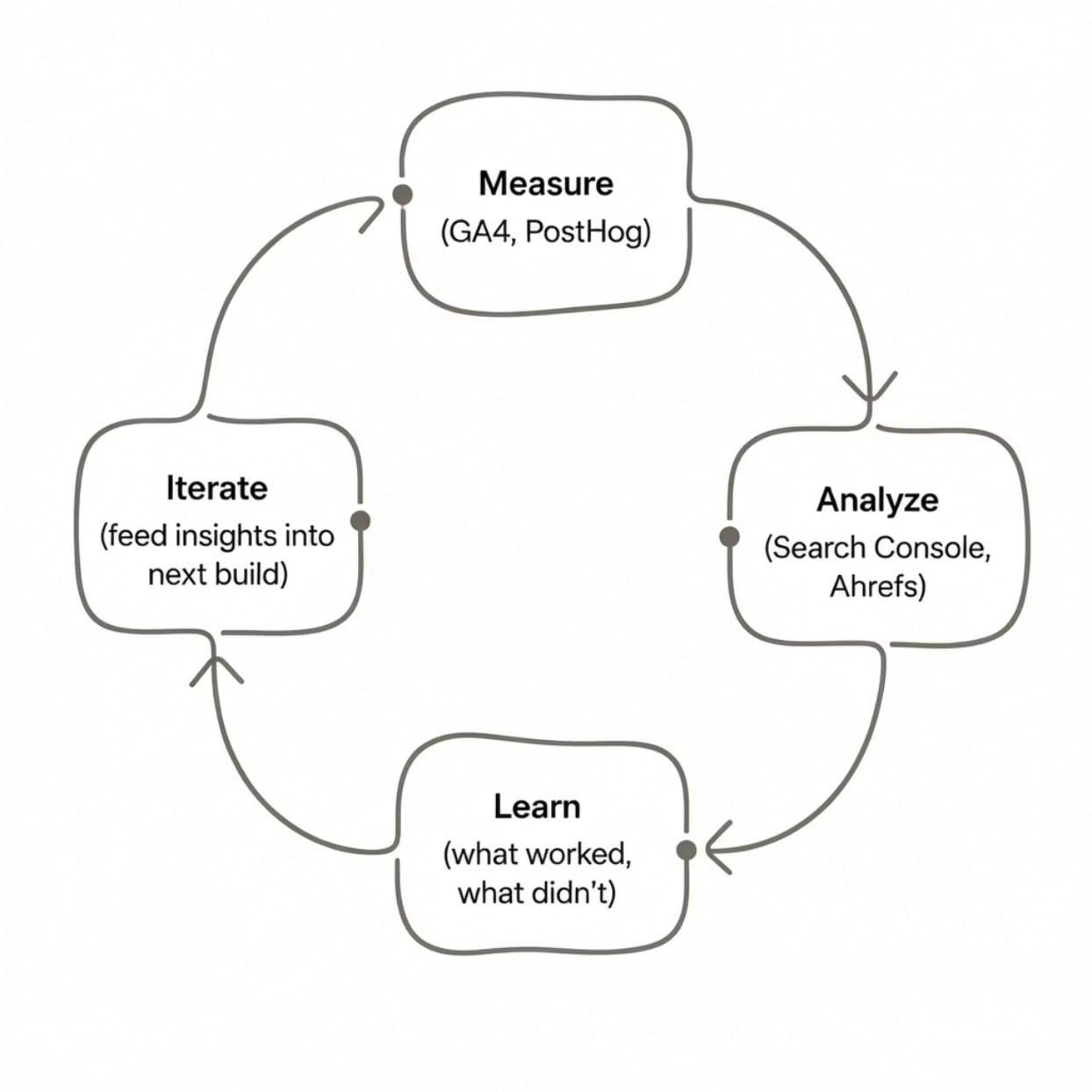
The loop: measure, analyze, learn, and iterate.

The loop shows how the analytics phase works in practice: measure with GA4 and PostHog, analyze with Search Console and Ahrefs, learn what worked and what did not, and iterate by feeding insights into the next build. Then the cycle starts again.

Prompts you can copy

Create a tracking plan

My product is [describe]. The core loop is [describe]. Create a tracking
plan: a list of events with names, when each fires, and the properties to
capture. Include a naming convention for campaign tracking links.

Weekly review

Here are this week's numbers: [paste traffic, sign-ups, activation,
revenue]. Compare them with last week: [paste]. Tell me what changed,
the most likely reasons, what I should not conclude yet, and the single
best experiment to run next.

Experiment brief

I want to test [change]. Write an experiment brief with a hypothesis,
the metric that proves it, the sample size or time needed, what could go
wrong, and how I will decide whether to keep it.

Common mistakes

  • Tracking vanity metrics. Followers and page views mean little without conversions.
  • No baseline. You cannot tell if you improved without knowing where you started.
  • Missing campaign tags. Without them, channels blur together.
  • Changing many things at once. You will not know what worked.
  • Ignoring qualitative feedback. Numbers cannot tell you why.
  • Too many tools. Choose a small stack and learn it well.

Checklist

  • One main goal and a few supporting metrics
  • Tracking plan written and tested
  • Campaign tags on every link
  • Weekly dashboard on one page
  • Funnel reviewed for the biggest drop-off
  • Search Console set up and checked
  • One experiment running at a time
  • Weekly review on the calendar

You're done when you can say which channels bring your best users, where people drop off, and what you will test next.

SUMMARY

Summary: Build the Loop

Every phase feeds the next. This is the full operating system, from first idea to second launch and beyond. The best founders don't stop at launch; they build the loop.

The eight steps

StepWhat you do
01IdeaValidate the problem
02BuildShip the MVP
03BrandBrand and launch assets
04LaunchDiscovery and community
05PRPR and outreach
06ContentContent distribution
07AnalyticsMeasure and learn
08Keep BuildingIterate with data

The finish line for each phase

PhaseOutputYou're done when
IdeaA wedge backed by evidenceYou can name a specific person, problem, and proof
BuildA live MVPA stranger can sign up, use it, and pay
BrandPositioning, copy, and assetsA stranger understands it in seconds
LaunchA multi-platform launchYou have launched, replied, and recorded results
PRThird-party coverageYou have secured at least one mention
ContentA weekly engineYou have a routine and a queue
AnalyticsA weekly reviewYou know what works and what to test next

How the loop works

Analytics tells you which channels, messages, and features worked. That feeds back into the next idea, the next build, the next brand tweak, and the next launch. Over time, each trip around the loop gets faster, because you know your audience better and have assets, relationships, and content already in place.

When something is not working, use the phases as a diagnostic:

  • Traffic is low. Look at Launch, PR, and Content.
  • People visit but do not sign up. Look at Brand and your landing page.
  • People sign up but do not use it. Look at Build and onboarding.
  • People use it but do not pay or stay. Look at the Idea, the value, and pricing.
YOUR PLAN

Your First 30 Days

One way to move through all seven phases in a month. Adjust it to your pace, but keep the order.

Week 1: Idea and wedge

  • Log at least 30 pain signals from Reddit, X, reviews, and forums.
  • Group them into themes and write your wedge sentence.
  • Talk to five real people.
  • Decide: build, narrow, or drop.

Week 2: Build

  • Write a one-page spec with a "not now" list.
  • Build the core loop, then sign-up and payments in test mode.
  • Connect your backend and save the project to GitHub.
  • Test on your phone as a stranger.

Week 3: Brand and prepare to launch

  • Write your positioning, tagline, and descriptions.
  • Put your landing page live and collect emails.
  • Create your launch assets and polish your founder profile.
  • Start showing up in communities. Build your list of people to notify.
  • Build your media list and send your first warm-up messages.

Week 4: Launch, PR, content, and analytics

  • Set up analytics and tracking links before you launch.
  • Launch across your chosen platforms and reply to every comment.
  • Send your press pitches and creator outreach.
  • Start your weekly content routine.
  • Hold your first weekly review and choose your next experiment.

Then, repeat

At the end of the month, you will have something live, a first audience, and real data. Take what you learned and start the next lap.

REFERENCE

Glossary

A/B test. An experiment that compares two versions of something to see which performs better.

Activation. The point at which a new user completes the core loop and experiences the product's value.

Backlink. A link from another website to yours. Quality backlinks help search rankings.

Conversion rate. The percentage of people who complete a desired action, such as signing up or paying.

Core loop. The single repeated action that delivers your product's value.

Funnel. The sequence of steps a user takes, such as visit, sign-up, activate, and pay, with drop-off measured at each step.

MVP (minimum viable product). The smallest version of a product that delivers the core value to real users.

Positioning. How you define who your product is for, what it does, and why it is better than the alternatives.

Retention. The share of users who come back after their first visit.

SEO (search engine optimization). Improving your site so people searching for relevant topics can find it.

UTM parameters. Tags added to links so analytics tools can tell which source, medium, and campaign sent a visitor.

Vibe coding. Building software by describing what you want in natural language and guiding AI tools that write the code.

Wedge. A narrow entry point where you can win a small group completely before expanding.

Portrait of Alex MacGregor
AUTHOR

Alex MacGregor

I talk about startups, founders, vibe coding, AI tools, distribution, personal branding, and creating leverage.

Unsubscribe anytime.